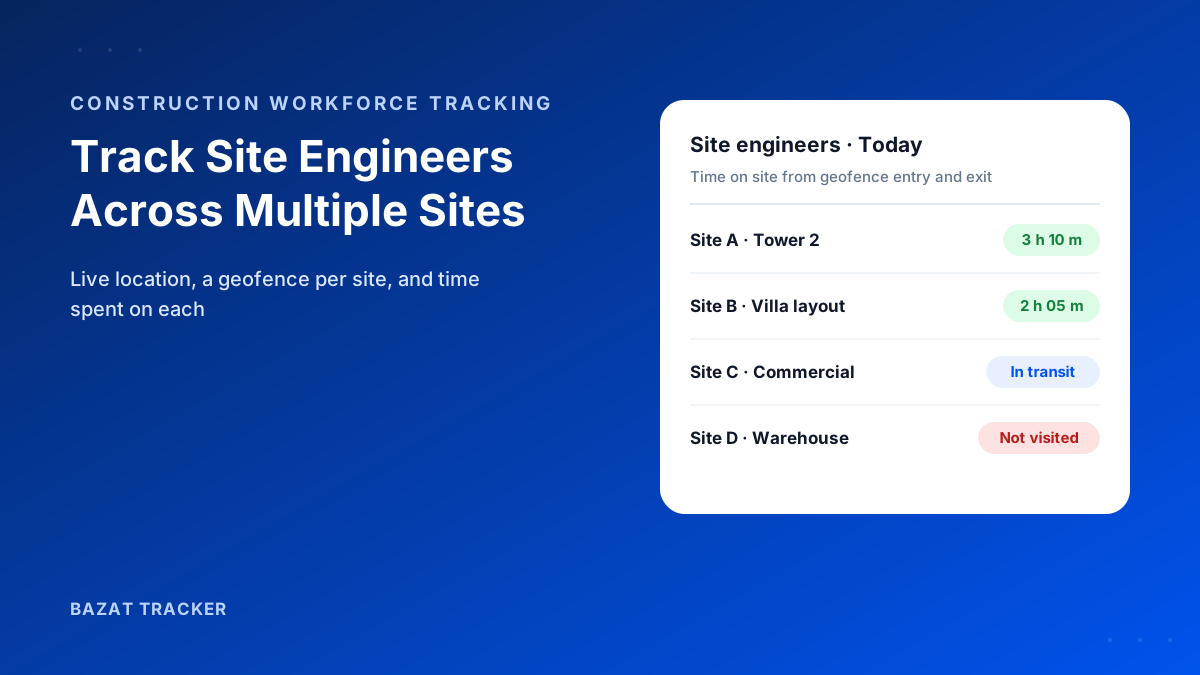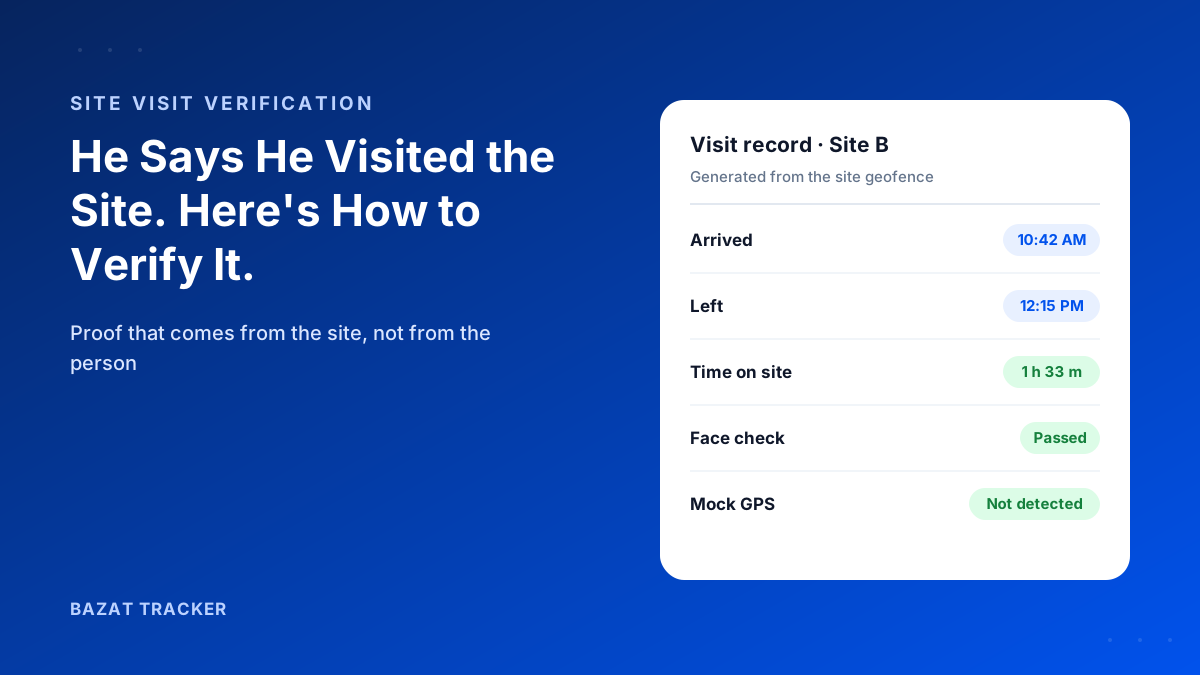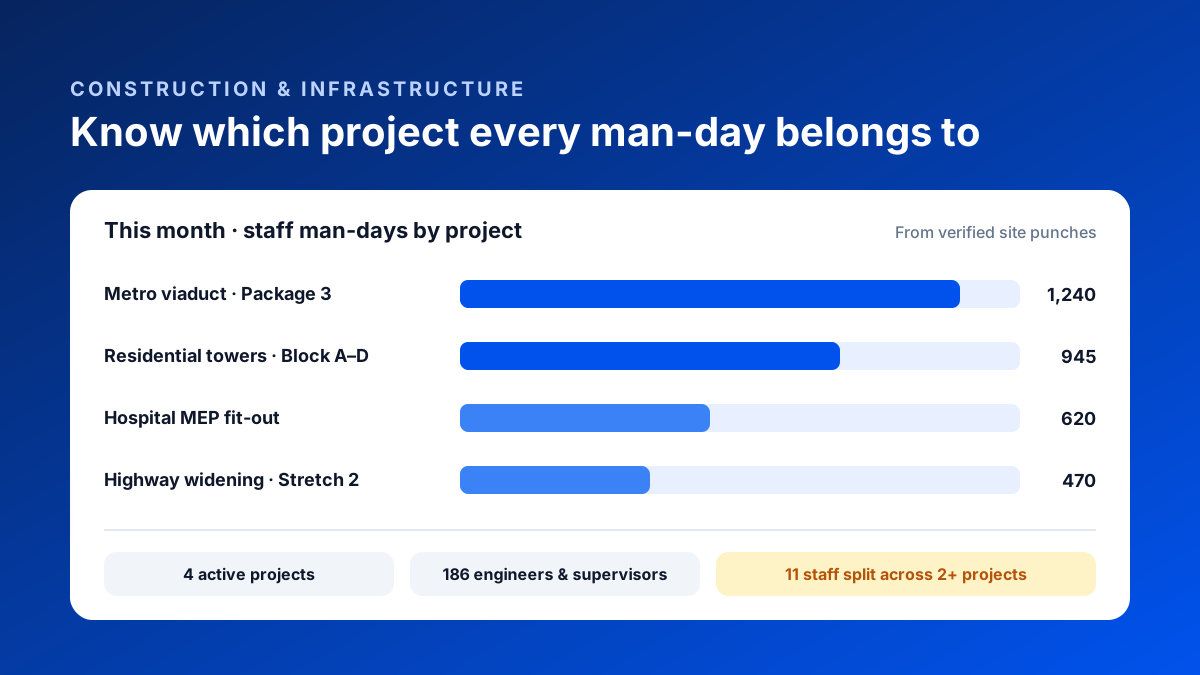
Monthly project review. The metro package is over its staff budget, and the project manager swears they had fewer engineers on site than the payroll says. The residential project looks under budget, but its site in-charge says they're short every day. Both can be right, because three of your MEP supervisors split their time between the two, and payroll books each of them to whichever project they were originally hired for.
For contractors, construction manpower management starts with project-wise attendance: every site engineer, supervisor and foreman punches in and out at the geofence of the project they are physically working at, with a face check. When staff move between projects, the time is split automatically by site. This gives contractors accurate man-days, staff cost and site-visit records per project, instead of allocating salaries on assumptions.
Sound like your last project review?
For a builder or contractor running one site, attendance is simple. Once you're running four, eight or fifteen projects at once, with civil, MEP and finishing crews and a pool of engineers who move wherever they're needed, attendance stops being an HR question. It becomes a project costing question.
This post is for large builders, civil contractors, MEP companies and infrastructure contractors with 50 to 300+ site staff. It covers why project-wise attendance matters, how to set it up, and what it fixes.
Why "Present" Isn't Enough for Contractors
A standard attendance system answers one question: was this person at work today? For a contractor, that's only the start.
The questions contractors actually need answered
- 1Which project were they at, and for how long?
- 2If they visited three sites, how many hours went to each?
- 3Did the site engineer actually visit the projects they're responsible for this week?
- 4How many staff man-days has each project used against its budget?
- 5Which supervisors are stretched across too many sites?
Here's why this gets expensive fast:
Staff cost is one of the biggest overheads on every project. If it's allocated by assumption ("Ramesh belongs to the metro project"), some projects look more profitable than they are, others look worse, and your tender pricing for the next job is built on wrong numbers.
How Project-Wise Attendance Works
The basic setup
- 1Create a geofence for every active project site. Large linear projects like highways and pipelines can have several geofences along the stretch.
- 2Assign staff to one or more projects, so the system knows where each person is expected to work.
- 3Staff punch in with a face check at whichever project they arrive at first.
- 4When they move to another project, entry and exit at each geofence are recorded, so the day is split by site.
- 5Travel between projects is kept separate from time on site.
- 6Reports show man-days and hours per project, per person, for any date range.
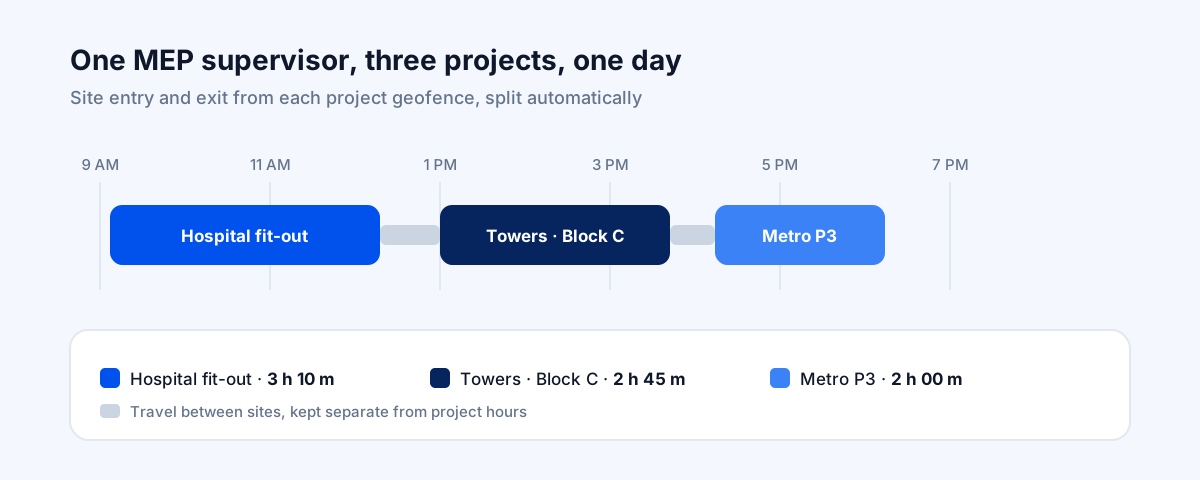
And here's the part that saves the most time:
Nobody fills in a timesheet. The project split comes from where the person actually was, verified by GPS and a face check, so it's both more accurate and less work than asking engineers to log their hours at the end of the day.
Construction Manpower Management by Contractor Type
Large builders:
Engineers, quality and safety staff often cover several towers or projects. Project-wise attendance shows real staffing per project and whether planned site visits happen, which matters a lot when one project starts slipping.
Civil and infrastructure contractors:
Highways, metro packages and pipelines are spread out over kilometres. Multiple geofences along a stretch, plus route history for supervisors who move along it, show coverage that a single gate register never could.
MEP contractors:
MEP crews and supervisors move between projects more than anyone, often spending a few hours at each. Splitting their time by site is the only way to know what each project's MEP scope really costs.
Manual Allocation vs Project-Wise Attendance
Allocating staff time across projects
| Registers & assumptions | Bazat Tracker | |
|---|---|---|
| Which project | Registers & assumptionsThe project the person was hired for | Bazat TrackerThe project geofence they actually punched in at |
| Staff who move | Registers & assumptionsBooked to one project, or split by guesswork | Bazat TrackerTime split automatically by site entry and exit |
| Site visits | Registers & assumptionsReported in review meetings | Bazat TrackerGPS-verified visits with time on site |
| Man-days per project | Registers & assumptionsCompiled from site registers at month end | Bazat TrackerLive report for any project and date range |
| Proxy attendance | Registers & assumptionsCommon with paper registers | Bazat TrackerFace match with liveness on every punch |
| Payroll | Registers & assumptionsSeparate data entry | Bazat TrackerVerified attendance flows into salary and OT |
Rolling It Out Across Projects
A rollout sequence that works
- 1Start with your engineers and supervisors, the staff who move between projects, before rolling out to every crew.
- 2Pick two projects that share staff, so the project split shows its value straight away.
- 3Draw each geofence around the actual site boundary. Test-punch from the farthest work point and the nearest point that shouldn't count.
- 4Plan for basements and towers: offline capture handles punches made without network.
- 5Review the first month's project-wise man-days with your project managers. The mismatches you find usually pay for the rollout.
- 6Extend to all projects and switch payroll over to app attendance.
Bazat Tracker gives construction and infrastructure contractors a geofence per project, face-verified punches, automatic time-on-site split by project, site visit tracking and payroll, from ₹249 per user per month on yearly billing.