Month-end on a mid-size residential project. The muster roll shows 40 workers a day on average. The labour contractor's bill claims 45. Your site engineer, if you ask him honestly, thinks it was closer to 36 on most days. You'll pay one of those numbers, and you have no way to know which one is true.
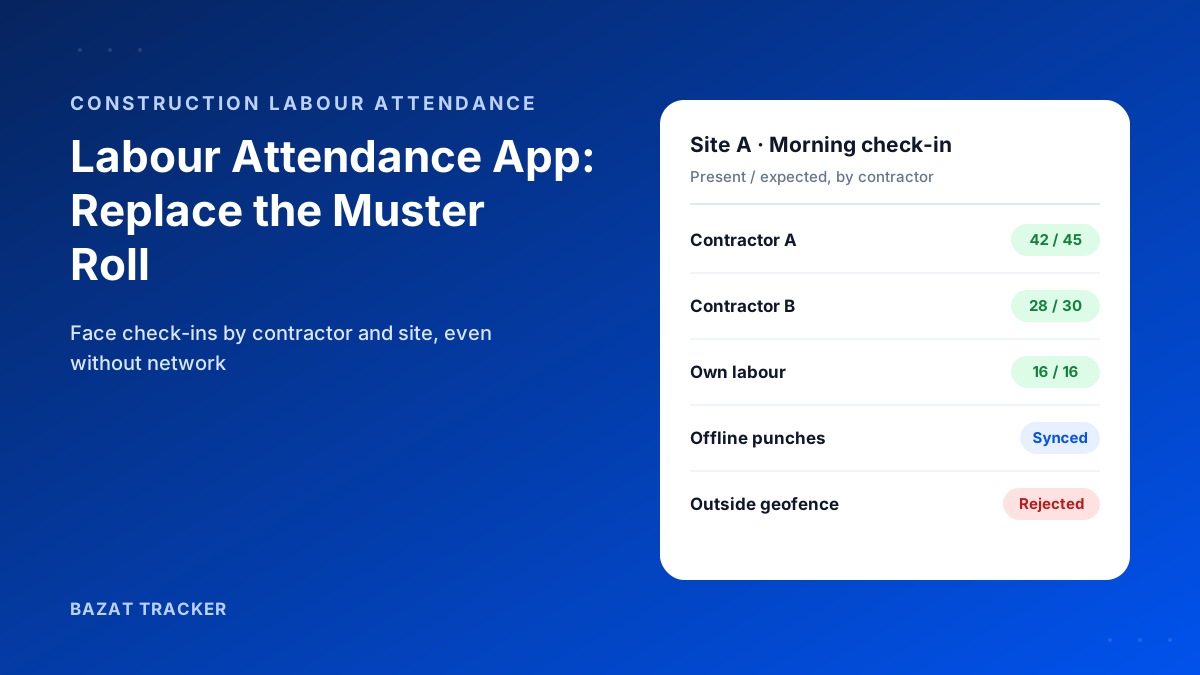
A labour attendance app replaces the paper muster roll with a digital record that can't be filled in later: each worker is checked in inside the site's geofence and matched by face, either on their own phone or through a supervisor's group check-in. The app works offline on sites with poor network, groups labour by contractor, and exports verified labour-days per site to check contractor bills and run payroll.
Why the Muster Roll Fails on Construction Sites
The paper muster roll was designed for a world where the person filling it had no reason to get it wrong. On a busy site, that's rarely true.
Where the numbers go wrong
- 1Names are marked present in the morning for workers who arrive late or not at all.
- 2The register is filled at the end of the day, or the end of the week, from memory.
- 3Contractor gangs are counted by the contractor's supervisor, who is also the one billing for them.
- 4Workers move between nearby sites, and get counted at both.
- 5There's no record of hours, only presence, so half days are paid as full days.
And it gets worse with every new site.
With one site, a project manager can walk around and count. With five sites across a city, the head office sees five registers and a contractor bill, and nothing to check them against.
What a Labour Attendance App Needs to Handle
Construction is not an office.
An attendance app built for office staff will struggle on a site. Before you choose one, make sure it handles the realities of construction labour.
Must-haves for construction
- 1Workers without smartphones: a supervisor-run group check-in that still verifies each worker's face.
- 2Per-site geofences, so a check-in only counts inside the right site boundary.
- 3Face verification with liveness, so a photo or a colleague can't pass.
- 4Offline capture for basements, upper floors and outskirts with no signal.
- 5Contractor-wise grouping, so each gang's labour-days can be checked against their bill.
- 6Hours, not just presence: check-in and check-out times for half days and overtime.
- 7Simple enough for a site supervisor to run in a few minutes each morning.
How It Works on a Typical Morning
Step by step
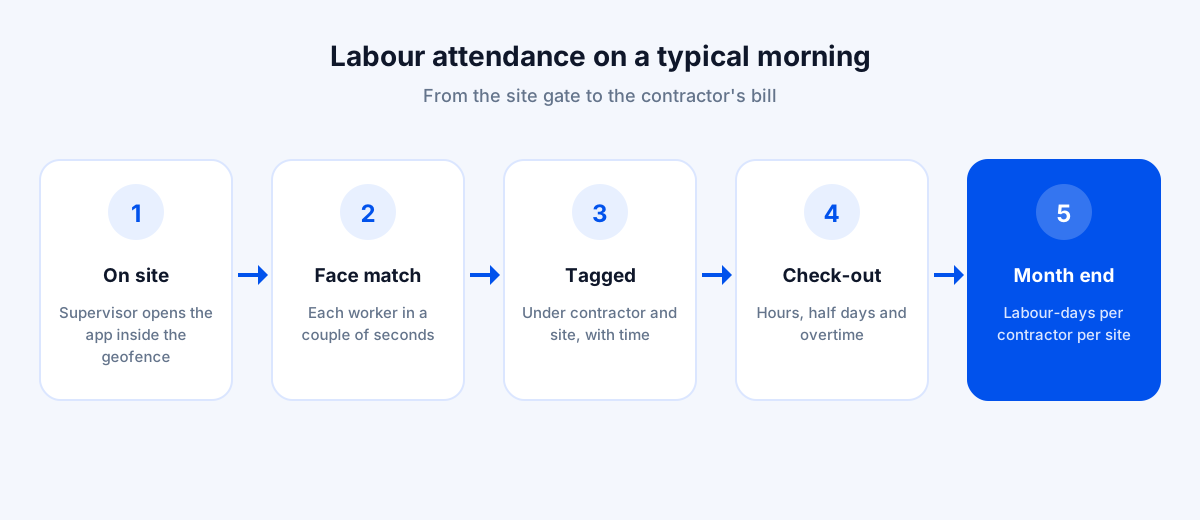
- 1The site supervisor opens the app inside the site's geofence. Outside the boundary, check-ins don't count.
- 2Workers line up; the supervisor's phone matches each face in a couple of seconds. Staff with their own phones punch in themselves.
- 3Each worker is recorded under their contractor and the site, with the time of check-in.
- 4If there's no network, everything is stored on the phone and syncs later.
- 5At day end, check-outs record hours worked, including half days and overtime.
- 6At month end, the app shows verified labour-days per contractor per site, ready to compare with the contractor's bill and run payroll.
Paper Muster Roll vs. Labour Attendance App
| Paper muster roll | Labour attendance app | |
|---|---|---|
| Who confirms presence | Paper muster rollWhoever fills the register | Labour attendance appThe worker's face, inside the site geofence |
| Can it be filled in later | Paper muster rollYes, often at day or week end | Labour attendance appNo, each check-in is timestamped |
| Contractor bill check | Paper muster rollContractor's count vs your register | Labour attendance appVerified labour-days per contractor, per site |
| Half days and overtime | Paper muster rollUsually not recorded | Labour attendance appCheck-in and check-out times recorded |
| Head-office visibility | Paper muster rollRegisters arrive at month end | Labour attendance appLive headcount per site, every day |
Using the Data to Check Contractor Bills
This is where the app usually pays for itself. When a labour contractor submits a bill for a month, you compare it with verified labour-days for that contractor's gang at that site. Differences become a specific conversation (“these 14 labour-days have no check-in”) rather than a general suspicion.
The same verified record supports your own client billing and RA bills, and your PF and ESI compliance for directly employed workers.
Here's what a bill check looks like in practice.
An illustrative month for one contractor
- 1The contractor bills for 1,080 labour-days on Site A.
- 2The app shows 1,012 verified labour-days for that gang at Site A.
- 3Of the difference, 40 days are workers who were checked in at Site B, a nearby site, on the same dates. They were billed at both.
- 4Another 28 days are names with no check-in at all.
- 5Instead of a general argument, you send the contractor a list of 68 specific labour-days, with dates and names, to justify or remove.
Handling Everyday Site Situations
Construction labour is fluid. A labour attendance app has to cope with the way sites actually run, not the way the roster says they do.
Common situations and how to handle them
- 1New workers mid-month: enrol their face on the first morning, before their first check-in, so their attendance is verified from day one.
- 2Workers shifted between sites: assign them to both sites. Each check-in is recorded against the site where it happened, so they can't be counted twice.
- 3Night pours and extended shifts: the check-out time captures the extra hours, so overtime is based on the record rather than the contractor's claim.
- 4Rain days and work stoppages: no check-ins means no labour-days, which keeps idle days out of the bill unless you've agreed otherwise.
- 5Workers who change phones often: with supervisor group check-ins, attendance depends on the worker's face, not on their phone.
Rolling It Out on Your Sites
- 1Start with one site where you already suspect the numbers. The comparison makes the case.
- 2Draw the site geofence and add contractors and their gangs.
- 3Enrol faces in one morning session, with the supervisor running a practice group check-in.
- 4Run the paper register in parallel for one week, then retire it.
- 5Tell contractors up front that bills will be checked against verified labour-days.
Bazat Tracker includes per-site geofences, face verification with liveness, supervisor group check-ins, offline capture, contractor grouping and payroll, from ₹249 per user per month on yearly billing, with a 3-day free trial.