Your service manager swears the technician reached the customer at 9 AM. The customer says nobody came until 11:30. The technician's timesheet says 8:55. Three versions of the same morning, and no way to know which one is true.
There are five common ways to track field employees: phone calls and messaging check-ins, paper or spreadsheet reports, vehicle GPS trackers, fixed biometric attendance machines, and field staff tracking apps. Only a field staff tracking app verifies the person's location, identity, attendance and visits together, works across many locations, and keeps a record that holds up in a dispute.
So which method is right for you?
That depends on what you actually need to prove. Below, we compare all five on the questions that matter: is it accurate, can it be faked, how much effort does it take, and does it respect employee privacy?
Method 1: Phone Calls and Messaging Check-Ins
This is where almost everyone starts. Staff send a “reached” message or a photo to a group chat, and managers call when they need an update.
Why it works at first:
It's free, everyone already has the apps, and with three or four people it's manageable.
Why it breaks:
Every update depends on someone remembering to send it and telling the truth. A “reached” message has no verified location, a photo could be from yesterday, and a manager with 20 people spends the first hour of every day chasing replies. When there's a dispute weeks later, you're scrolling through chat history hoping someone wrote it down.
Method 2: Paper Registers, Visit Reports and Spreadsheets
Staff fill in a register at the site gate, a visit report at the end of the day, or a shared spreadsheet that someone updates on Friday.
The upside?
It creates a written record and it's familiar to everyone.
The downside is bigger.
Entries are self-reported and often filled in after the fact. Times get rounded, visits get “remembered”, and a colleague can sign in for someone who hasn't arrived. Then someone has to re-type all of it into payroll at month-end.
Method 3: Vehicle GPS Trackers
A hardware GPS unit fitted to company vehicles reports where each vehicle goes.
Here's what it's good at:
Fleet management. Fuel use, routes, speeding and vehicle utilisation are all well covered.
But here's the gap:
It tracks the vehicle, not the person. It can't tell you whether the employee walked into the client's office, worked a full shift, or whether someone else was driving. Staff who travel by public transport, bike or their own car aren't covered at all. And each vehicle needs a device and installation.
Method 4: Biometric Attendance Machines at Each Site
A fingerprint or face-recognition machine is installed at the office or at each site, and staff punch in on it.
It solves one problem well:
Identity. It's hard for someone else to punch in for you on a biometric machine.
And creates three more.
It only works at the spot where it's installed, so it says nothing about the rest of the day: client visits, travel or time at a second site. Every new site needs new hardware. And temporary or remote locations usually never get a machine at all.
Method 5: A Field Staff Tracking App
Employees use an app on their own or a company phone. During shift hours it records location, verifies punch-ins against a geofence (a map boundary around each site), confirms identity with a face check, and logs every client or site visit.
This is the only method that covers the whole day.
Attendance, identity, location, visits and travel are all verified in one record, at every location, with no hardware to install. Good apps also detect fake-GPS tricks, keep working offline, and send verified hours straight into payroll.
What's the trade-off?
There's a per-user subscription, and you need to roll it out transparently so employees understand what's tracked and when. Tracking should run only during shift hours.
All 5 Methods Side by Side
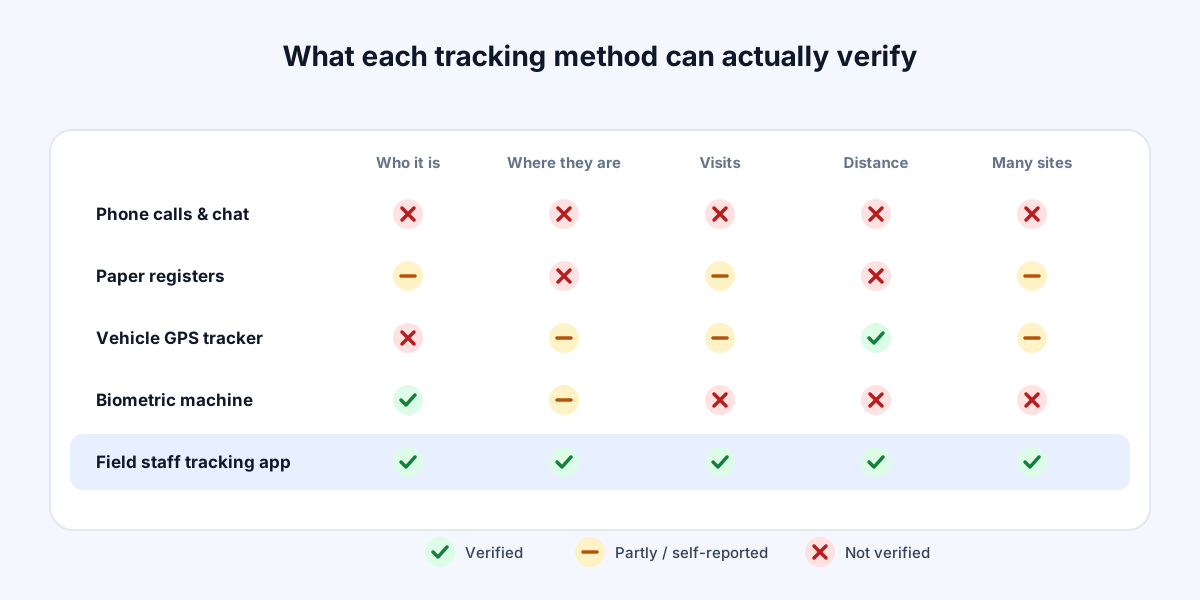
Here's the quick comparison:
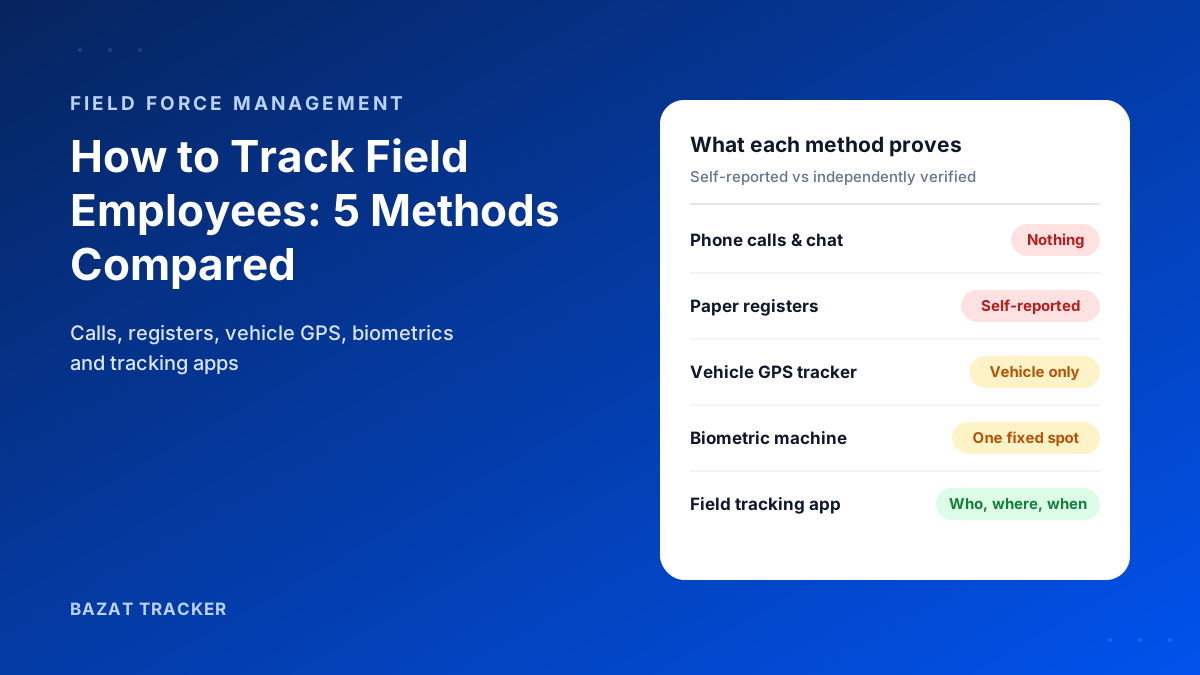
What each method can actually prove
- 1Phone calls and chat check-ins: nothing verified. Location, time and identity are all self-reported.
- 2Paper registers and spreadsheets: a written record, but self-reported and easy to fill in after the fact.
- 3Vehicle GPS trackers: where the vehicle went. Not who was driving, or whether they worked.
- 4Biometric machines: who punched in, at one fixed spot. Nothing about visits, travel or other sites.
- 5Field staff tracking app: who, where, when and for how long, across every site, visit and route.
Manual Methods vs. a Field Staff Tracking App
| Manual Process | Bazat Tracker | |
|---|---|---|
| Verifies where the employee is | Manual ProcessNo, or only the vehicle's location | Bazat TrackerYes, live location during shift hours |
| Verifies who it is | Manual ProcessOnly with a biometric machine at one spot | Bazat TrackerFace check on every punch |
| Covers client and site visits | Manual ProcessSelf-reported notes or photos | Bazat TrackerVisits logged with location, time and proof |
| Works across many locations | Manual ProcessNeeds hardware or a person at each site | Bazat TrackerAny site, no hardware, set up from the dashboard |
| Hard to fake | Manual ProcessEasy to backfill, share or round off | Bazat TrackerGeofence, face match and fake-GPS detection |
| Feeds payroll | Manual ProcessRe-typed by hand at month-end | Bazat TrackerVerified hours flow into leave and payroll |
Which Method Should You Choose?
Here's a simple rule of thumb:
Match the method to the problem
- 1Two or three staff and no disputes? Calls and chat check-ins can be enough, for now.
- 2Managing a vehicle fleet? Add vehicle GPS, but don't rely on it for attendance.
- 3Everyone works at one fixed site? A biometric machine covers attendance there.
- 4Staff move between sites, clients or routes, or you're seeing attendance and visit disputes? Use a field staff tracking app.
Still unsure?
Ask yourself one question: when a customer or employee disputes what happened last Tuesday, what record will you open? If the honest answer is a chat history, it's time to switch.
The Bottom Line
Calls, spreadsheets, vehicle trackers and biometric machines each answer one part of the question. A field staff tracking app answers all of it: who worked, where, when, and for how long, in a record that holds up.
Bazat Tracker does this on Android, iOS and the web, from $4 per user per month (₹249 in India), with leave and payroll built in.