It's the 28th of the month. Your payroll team has 34 attendance sheets to type up: one from every client site. Half arrive as WhatsApp photos of a register, three are missing pages, and one site supervisor has marked the entire housekeeping team present for a day the client says the washrooms weren't cleaned. Meanwhile, the client wants a deployment report before they release this month's invoice.
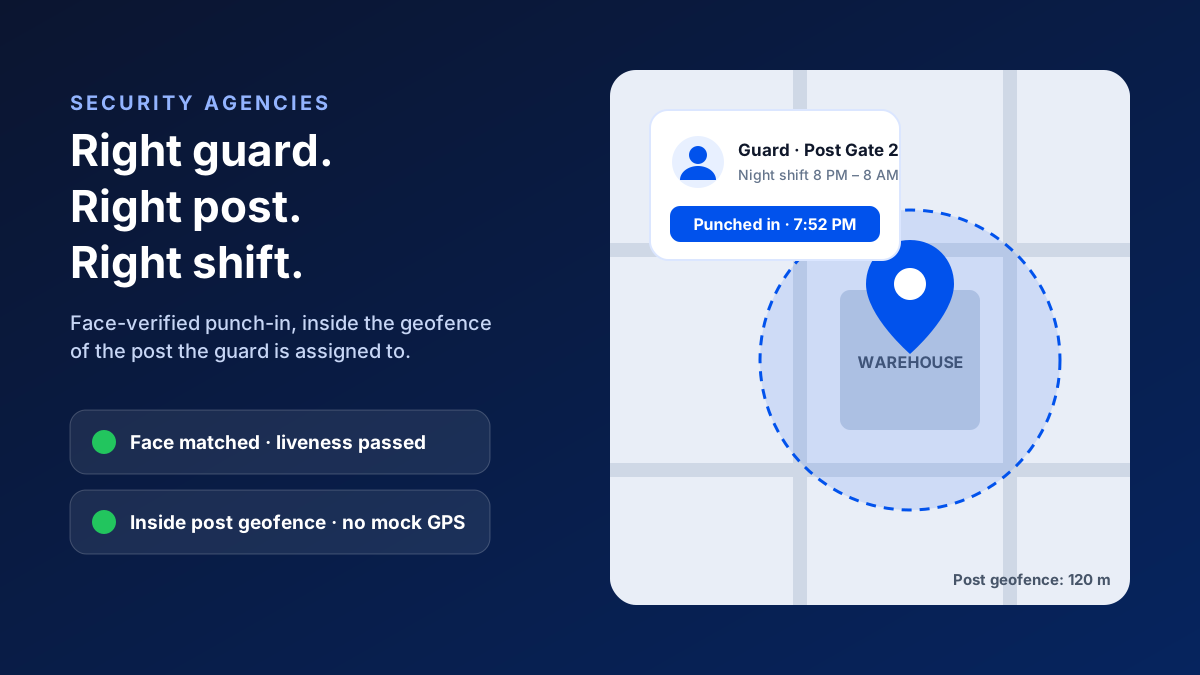
A facility management attendance app lets housekeeping, maintenance and security staff punch in with a face check inside the geofence of the client site they're assigned to. Each punch is matched to their shift, supervisor site visits are logged with GPS, and the verified attendance flows into payroll and client-wise reports, with no paper registers or WhatsApp photos.
If that month-end scene feels familiar, you're in good company.
Almost every facility management company in India hits the same wall somewhere between 50 and 500 employees. The work is spread across tech parks, apartment societies, hospitals, malls and corporate offices. The people doing it rarely see the head office. And the systems most FM companies start with, like paper registers, a biometric machine at each site and a WhatsApp group per client, break down just as the business starts growing.
This guide covers why attendance is harder in facility management than almost anywhere else, what a good system needs to do, and how to roll one out across every client site without a revolt from your supervisors.
Why Attendance Is So Hard for FM Companies
In a normal office, attendance is one building, one shift and one HR team. A facility management company runs dozens of small workplaces at once, and none of them belong to you.
What makes facility management different
- 1Many locations: staff are spread across 10, 30 or 100 client sites, each with its own headcount commitment.
- 2Many shifts: housekeeping often runs morning, general and night shifts, and hospitals and malls run around the clock.
- 3High churn and relievers: new joiners and relief staff move between sites, so who is posted where changes every week.
- 4Client accountability: the client pays for a committed headcount, and wants proof that it was actually deployed.
- 5Supervisor dependency: one supervisor covers several sites, and the whole system relies on them visiting and reporting honestly.
- 6Payroll pressure: wages, overtime, PF and ESI all depend on attendance that arrives late and messy.
Here's the real problem:
Every one of those points depends on attendance being correct, and the usual tools can't prove it. A paper register proves someone wrote a name. A WhatsApp selfie proves someone was somewhere at some time. A biometric machine proves a finger touched a device, but only at sites where the client let you install one, and only while it works.
The Hidden Cost of Getting It Wrong
Bad attendance in facility management doesn't just mean sloppy HR. It shows up directly in your margins.
Where the money leaks
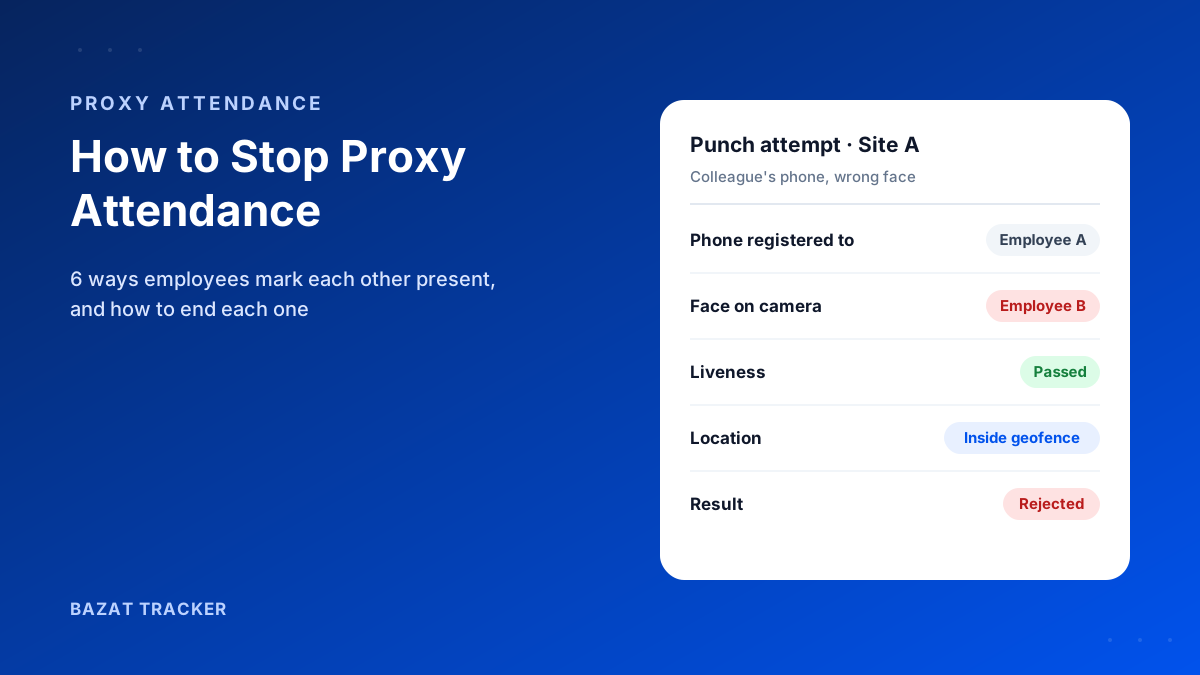
- 1Proxy attendance: one staff member marks a colleague present, and you pay wages for a shift nobody worked.
- 2Short deployment: a site committed to 20 people runs with 16, and the client deducts it from the invoice when they find out.
- 3Disputed invoices: without a client-wise deployment report, every billing conversation turns into an argument.
- 4Payroll hours: someone in the payroll team spends days every month retyping registers, chasing missing sheets and fixing errors.
- 5Unvisited sites: supervisors claim visits they never made, and problems surface only when the client complains.
And here's the part most owners underestimate.
Clients compare vendors. When a competitor can show a live, site-wise attendance report and you send a scanned register, the contract renewal conversation is already lost, whatever the quality of your cleaning.
What a Facility Management Attendance App Must Do
Not every attendance app is built for this. Many were designed for one office or for field sales reps. For FM, look for these capabilities:
The must-have checklist
- 1Site-wise geofencing: every client site gets its own boundary, and staff can only punch in at the site they're assigned to.
- 2Face verification with liveness on every punch, so a colleague can't punch for someone who isn't there.
- 3Fake-GPS detection, so a mock-location app can't place a phone inside the geofence from home.
- 4Shift rules: morning, general and night shifts, with late marks, early exits and overtime worked out automatically.
- 5Supervisor visit tracking: each supervisor's site visits logged with GPS and time on site.
- 6Offline capture for basements, plant rooms and service floors with no network.
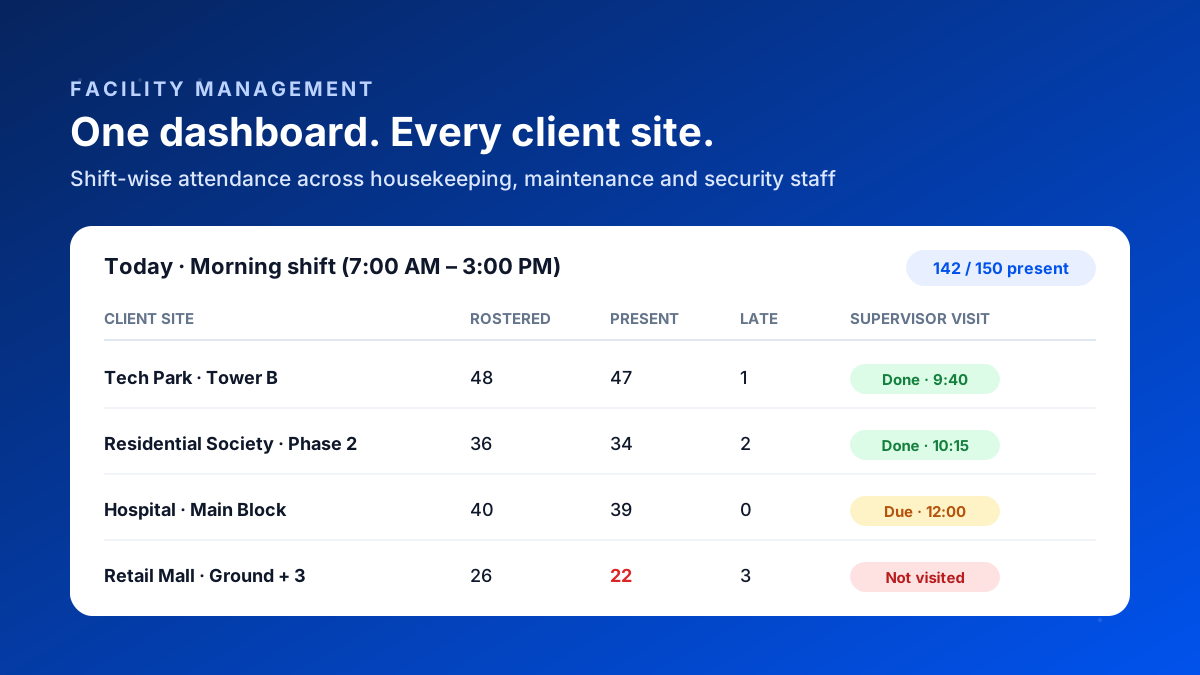
- 7Client-wise reports: deployment, attendance and coverage per site, ready to share with the client.
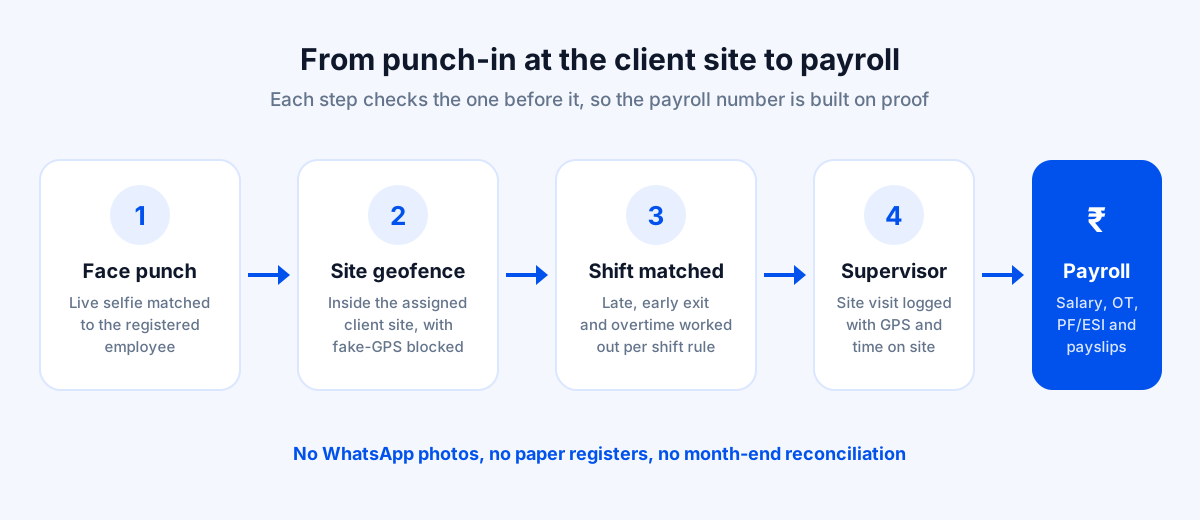
- 8Built-in payroll, so verified attendance becomes salary, overtime, PF/ESI and payslips without re-entry.
How It Works on a Normal Day
Here's what a morning shift looks like for an FM company running 150 people across a tech park, a residential society, a hospital and a mall.
6:55 AM: the first punches come in.
Housekeeping staff arrive at the tech park, open the app and punch in. The app takes a live selfie, matches it to their registered face and checks that the phone is inside the tech park's geofence. Each punch is recorded against the morning shift with the exact time.
7:15 AM: the gaps show up on their own.
The operations manager opens the dashboard. The mall is four people short. Nobody had to call around: the shortfall is right there against the rostered headcount, early enough to send relievers before the client's facilities team notices.
10:15 AM: the supervisor's rounds are on record.
The area supervisor has visited two of their four sites. Each visit shows when they arrived, when they left and how long they stayed. If the hospital visit due at noon doesn't happen, it's visible the same day, not at the next client review.
Month end: payroll takes hours, not days.
There's no typing up registers. Verified attendance, late marks and overtime are already calculated per shift, and they flow into salary, PF/ESI and payslips. The same data produces a client-wise deployment report for every site, ready to attach to the invoice.
Relievers, Floaters and New Joiners
This is where most FM attendance systems quietly break. The rostered team at a site is rarely the team that actually turns up. Someone is on leave, a reliever covers, a floater spends the morning at one site and the afternoon at another, and three new joiners start on Monday.
So how do you keep that straight?
What to set up
- 1Assign relievers and floaters to every site they might cover, so their punch is accepted wherever they are sent.
- 2Keep each punch tied to the site where it happened, so attendance and billing follow the actual deployment, not the original roster.
- 3Register new joiners' faces on their first day, before their first punch, so the first week is verified too.
- 4Review which sites relied on relievers most each month. Those are usually the sites with a retention problem.
Done this way, the client-wise report shows who really worked at their site, including cover staff, and your payroll pays the reliever for the shifts they actually covered.
Paper Registers vs a Verified Attendance App
Running attendance across client sites
| Registers, biometrics & WhatsApp | Bazat Tracker | |
|---|---|---|
| Proof of presence | Registers, biometrics & WhatsAppSignature or WhatsApp photo, easy to fake | Bazat TrackerFace match with liveness, inside the site geofence |
| Hardware per site | Registers, biometrics & WhatsAppBiometric device per site, if the client allows it | Bazat TrackerNone: staff use their own phones |
| Short deployment | Registers, biometrics & WhatsAppDiscovered after the client complains | Bazat TrackerVisible against rostered headcount within minutes of shift start |
| Supervisor visits | Registers, biometrics & WhatsAppSelf-reported in a diary or a WhatsApp message | Bazat TrackerGPS-logged with arrival, departure and time on site |
| Client reporting | Registers, biometrics & WhatsAppScanned registers, compiled by hand | Bazat TrackerClient-wise deployment and attendance reports |
| Payroll | Registers, biometrics & WhatsAppDays of data entry and corrections | Bazat TrackerAttendance flows into salary, OT, PF/ESI and payslips |
Wages, Overtime, PF and ESI All Start With Attendance
For an FM company in India, attendance isn't just an operations number. Every statutory calculation that follows (wages paid against state minimum wage rates, overtime, PF and ESI contributions) is built on the days and hours recorded.
That cuts both ways.
Under-record attendance and you risk underpayment complaints, disputes with staff and uncomfortable questions during a labour inspection or a client's vendor audit. Over-record it and you pay wages and contributions for shifts nobody worked. Many large clients now ask their FM vendors for proof of statutory compliance before renewing a contract.
Verified, site-wise attendance that flows straight into payroll gives you one consistent record: the same days and hours appear on the client's deployment report, the employee's payslip and the PF/ESI calculation. The rates and rules themselves vary by state and change from time to time, so have your payroll or compliance advisor confirm how they apply to your sites.
How to Roll It Out Across Every Client Site
The software is the easy part. Adoption is where FM rollouts succeed or fail.
A rollout plan that works
- 1Start with two or three sites that have a supportive supervisor, not your most difficult client.
- 2Add every site with its own geofence, sized to the premises. Large campuses may need a bigger radius or more than one geofence.
- 3Set up shifts once (timings, grace period, overtime rules) and assign each employee a site and a shift.
- 4Register faces in a single session per site. Supervisors can do it for their team in a few minutes each.
- 5Run the app alongside the old register for one or two weeks, then compare. Mismatches usually point to the problem sites.
- 6Explain the why to staff: accurate attendance means correct salaries and overtime, paid on time.
- 7Expand site by site, and switch payroll over once a full month of attendance has come from the app.
Keep tracking limited to shift hours and tell employees exactly what is recorded. Transparency is both the legal and the practical way to get buy-in from frontline staff.
Mistakes FM Companies Make
Avoid these
- 1Rolling out to every site in week one. Problems at one site turn into problems at thirty. Start small.
- 2One geofence size for all sites. A hospital campus and a 12-floor office tower need very different boundaries.
- 3Leaving the paper register running indefinitely. A parallel run should end on a fixed date, or staff will keep using whichever is easier.
- 4Letting supervisors punch for their team without a face check. That recreates the register problem on a phone.
- 5Not sharing reports with clients. The deployment report is one of your strongest renewal arguments. Use it.
What Does It Cost?
Most FM companies already pay for attendance, through biometric devices, payroll staff hours and invoice deductions. Bazat Tracker is priced per user, from ₹249 per user per month on yearly billing, and includes face attendance, geofencing, shift rules, supervisor visit tracking, payroll and reports in the same plan. You can try it free for 3 days with a few sites before you commit.